

LPCAMM2 in Laptops in 2026: Is User-Upgradeable Fast LPDDR5X Memory Returning?
For years, laptop buyers have faced an awkward choice. Traditional SO-DIMM memory could usually be replaced or expanded, but the thinnest and most power-efficient machines increasingly relied on LPDDR memory soldered directly to the motherboard. LPCAMM2 is beginning to remove that compromise. By 2026, this compact removable memory format is appearing in a wider range of business laptops, mobile workstations and repair-focused notebooks, including current Lenovo, Dell and Framework models. It combines LPDDR5X memory with a replaceable module, so a laptop can retain much of the speed, efficiency and space-saving advantage associated with soldered memory while still giving its owner a realistic upgrade path. Adoption is not yet universal, and memory availability has created some unexpected problems, but LPCAMM2 has moved far enough beyond its first commercial appearance to become a meaningful option for people buying a laptop they hope to keep for several years.
Why LPCAMM2 Matters After Years of Soldered LPDDR Memory
The problem LPCAMM2 addresses is easy to understand without getting deeply into memory engineering. Laptop manufacturers traditionally used SO-DIMM modules because they were inexpensive, widely available and straightforward to replace. A notebook bought with 16GB could often be upgraded to 32GB or 64GB simply by opening the bottom cover and fitting new modules. As notebooks became thinner and battery-life targets increased, manufacturers increasingly turned to LPDDR memory. LPDDR5 and LPDDR5X consume relatively little power and can provide high bandwidth, making them particularly useful in compact notebooks and systems that rely heavily on integrated graphics. The disadvantage for buyers was that LPDDR memory was normally soldered to the motherboard. Whatever capacity was selected when the laptop was purchased effectively became a permanent specification.
LPCAMM2, short for Low-Power Compression-Attached Memory Module 2, places LPDDR5X chips on a removable module instead. CAMM2 has been standardised through JEDEC rather than remaining a design tied to a single PC manufacturer. The original JESD318 CAMM2 specification arrived in 2023 and covered both DDR5 and LPDDR5/LPDDR5X versions, while development has continued since then. An updated JEDEC design annex for LPDDR5/5X CAMM2 was published in May 2026. That continuing standards work matters because a common specification gives notebook makers, memory suppliers and component manufacturers a shared basis for future products. It does not guarantee that every LPCAMM2 module will work in every machine, but it makes widespread adoption far more realistic than a proprietary memory format would.
Performance has also progressed. Early commercially available LPCAMM2 notebooks commonly operated around 7,500 MT/s, while current designs have moved higher. Micron now lists LPCAMM2 technology capable of reaching up to 9,600 MT/s, although the speed actually delivered by a laptop depends on its processor and memory controller. Current 2026 machines therefore do not all run at the maximum speed printed on the memory module. Even so, LPCAMM2 allows manufacturers to use fast LPDDR5X without permanently attaching the memory chips to the board. That is particularly relevant as integrated graphics, local AI tools, large creative projects and heavier multitasking place more pressure on both memory capacity and bandwidth. A laptop that can start with a sensible amount of RAM and later accept a larger module is much less likely to become obsolete simply because its memory can no longer meet the owner’s workload.
How a Single LPCAMM2 Module Differs from a Traditional SO-DIMM
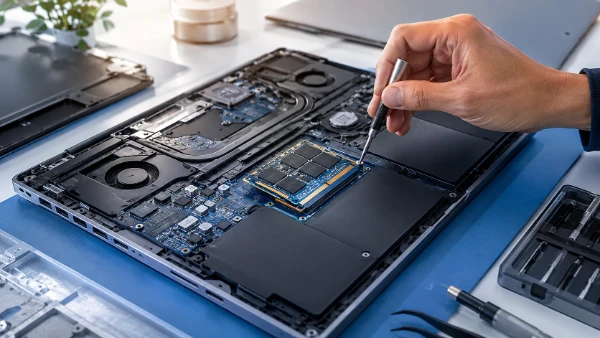
An LPCAMM2 module looks quite different from the narrow SO-DIMM sticks familiar from older upgradeable notebooks. It is broader and flatter and sits close against the motherboard rather than standing in a conventional socket at an angle. The module is pressed against its connector and secured with screws and a cover or heat-spreading assembly. This arrangement is one reason LPCAMM2 can fit into thinner designs. It also reduces the space needed for the memory subsystem compared with a pair of conventional SO-DIMMs. Micron has cited substantial space savings compared with stacked DDR5 SO-DIMM configurations, giving laptop designers more room that can potentially be used for cooling, battery capacity or a thinner internal layout.
Another important difference is that one LPCAMM2 module can provide dual-channel memory. With traditional laptop DDR memory, buyers have often needed two SO-DIMMs to obtain the preferred dual-channel configuration. LPCAMM2 can provide the required memory channels through a single module, which simplifies capacity choices while avoiding the performance penalty associated with a single conventional memory stick in many older notebooks. For ordinary users, the practical point is more important than the electrical arrangement: replacing one 32GB LPCAMM2 module with a compatible 64GB or 96GB module does not automatically mean sacrificing the normal memory configuration expected by the laptop. That makes a one-module design considerably more useful than it might initially sound.
The replacement process is still slightly different from the familiar push-and-click method used with SO-DIMMs. An LPCAMM2 module is normally held down with several screws, and the screws may need to be tightened in the specified order so that pressure is applied evenly across the connector. Lenovo’s service information for earlier LPCAMM2 ThinkPads specifically addresses correct installation because insufficient or uneven contact can prevent a machine from booting. This does not make LPCAMM2 unsuitable for owner upgrades, but it means the manufacturer’s maintenance instructions should be followed rather than treating the module exactly like an old RAM stick. In a well-designed laptop with accessible screws and a removable bottom panel, the job remains entirely realistic for a careful owner and considerably easier than replacing soldered memory, which is effectively beyond normal home repair.
Which Laptops Actually Use LPCAMM2 in 2026?
Lenovo provided one of the earliest important demonstrations of the concept with the ThinkPad P1 Gen 7, introduced in 2024 with customer-replaceable LPCAMM2 LPDDR5X memory. By 2026, Lenovo is using the format in substantially newer machines rather than leaving it confined to that first-generation example. The ThinkPad P1 Gen 9 supports one upgradeable LPCAMM2 module with capacities reaching 96GB, while Lenovo’s specifications list 16GB, 32GB, 64GB and 96GB options. The 2026 ThinkPad T14 Gen 7 with Intel processors also uses one dual-channel LPCAMM2 module, with configurations reaching 64GB. This is particularly significant because the T14 belongs to Lenovo’s mainstream business range rather than being only a specialist mobile workstation. Lenovo’s 2026 P14s Gen 7 specification goes further again, listing upgradeable LPCAMM2 memory with capacity up to 96GB.
Dell has also adopted LPCAMM2 in current professional notebooks. The 2026 Dell Pro Precision 5 Series includes models such as the 14-inch PW514261 and 16-inch PW516261 with LPCAMM2 LPDDR5X memory running at up to 8,533 MT/s. Dell lists 16GB, 32GB and 64GB configurations, with a single module providing dual-channel operation. Service documentation for the range includes procedures for removing and installing LPCAMM2 memory, showing that replaceability is part of the actual product design rather than merely a theoretical property of the memory specification. The presence of LPCAMM2 in current Dell and Lenovo commercial machines is important because large business notebook families can create a much bigger component market than one experimental consumer model ever could.
Framework added another notable example in 2026 with the Intel version of the Framework Laptop 13 Pro. Framework has built its reputation around repairable and upgradeable notebooks, so switching from conventional DDR memory to LPDDR5X presented an obvious difficulty: soldering the RAM would have gone against one of the defining characteristics of its laptops. LPCAMM2 provided a way to use LPDDR5X while retaining replaceable memory. The Laptop 13 Pro therefore uses a single LPCAMM2 slot, and Framework currently specifies support for capacities up to 96GB. Its adoption is especially relevant for enthusiasts because Framework actively publishes repair guidance and memory compatibility information. LPCAMM2 is consequently appearing in three rather different areas in 2026: mainstream corporate ThinkPads, professional Dell workstations and a notebook explicitly designed for owners who expect to repair and upgrade their own hardware.
Capacities, Real Memory Speeds and Upgrade Limitations
The number written on an LPCAMM2 module does not necessarily tell you the speed it will reach after installation. Lenovo’s ThinkPad T14 Gen 7 is a good example. Some configurations contain LPDDR5X-8533 memory but operate it at 7,467 MT/s or 6,800 MT/s because of limits elsewhere in the system. Framework gives similarly specific guidance for the 2026 Laptop 13 Pro. Its validated LPCAMM2 modules may be rated for 8,533 MT/s, but Framework states that the Core Ultra 5 325 configuration runs memory at up to 6,800 MT/s, while Core Ultra X7 358H and Ultra X9 388H versions can reach up to 7,467 MT/s. Dell’s Pro Precision 5 14 and 16 specifications, by comparison, list LPCAMM2 memory at 8,533 MT/s. Buyers should therefore treat the module rating and the laptop’s supported operating speed as two separate specifications.
Capacity support varies as well. Dell currently specifies up to 64GB in the Pro Precision 5 models mentioned above, while Lenovo’s ThinkPad P1 Gen 9 reaches 96GB. Framework also lists support for a single LPCAMM2 module up to 96GB in its 2026 Laptop 13 Pro compatibility information. The advantage is clear for someone buying a machine with 16GB or 32GB today: if the notebook firmware, processor and manufacturer support the larger capacity, the existing module can later be removed and replaced. The limitation is that most of these machines have one LPCAMM2 connector rather than two independent memory slots. Increasing capacity therefore normally means replacing the entire module rather than adding a second stick alongside the first one. The old module may still have resale or reuse value, but an upgrade is less incremental than adding another matching SO-DIMM.
Compatibility should not be assumed purely because two modules carry the LPCAMM2 name. The standard provides a common foundation, but laptop manufacturers still validate particular capacities, module designs and speeds for their systems. Firmware support and processor limits also matter. Framework, for example, maintains a validated module list for the Laptop 13 Pro rather than promising unrestricted compatibility with every LPCAMM2 product. Lenovo and Dell provide their own supported configurations and service parts. For anyone planning an upgrade, the safest approach in 2026 is to check the laptop’s official memory specification and maintenance documentation first, then confirm that the exact replacement module has been validated or is clearly listed as compatible. This is especially important because the market is still young enough that there are fewer third-party LPCAMM2 choices than there are DDR5 SO-DIMMs.
Is User-Upgradeable LPDDR5X Really Returning?
For selected laptops, the answer in 2026 is yes. LPCAMM2 demonstrates that fast, low-power LPDDR5X and owner-replaceable memory are no longer mutually exclusive. That is a meaningful change from the direction much of the notebook industry took during the previous decade. A buyer can now choose certain thin business or professional laptops with LPDDR5X and still retain the possibility of replacing the memory later. The ThinkPad P1 Gen 9 reaching 96GB, the ThinkPad T14 Gen 7 bringing LPCAMM2 into a mainstream corporate notebook, Dell offering 8,533 MT/s configurations in its current Pro Precision 5 range and Framework adopting the format in a repair-focused model all provide stronger evidence than a single demonstration product. LPCAMM2 has become a genuine shipping technology, even though it is far from being the default memory arrangement across the entire laptop market.
There are also good reasons for the technology to remain relevant as notebooks become more dependent on shared system memory. Modern integrated graphics use main RAM rather than dedicated graphics memory, so memory speed and bandwidth can directly affect graphics performance. Local AI applications can also require substantial memory capacity alongside the operating system and ordinary software. A machine purchased with 16GB may still be adequate for office tasks today, but workloads can change dramatically over a four- or five-year ownership period. With soldered LPDDR5X, the only practical solution to an inadequate memory capacity may be replacing the whole laptop. With LPCAMM2, the memory can potentially be changed while the processor, display, battery, storage and chassis continue to be used. That can make a significant difference to the useful life of an otherwise capable computer.
However, LPCAMM2 has not yet recreated the mature upgrade market that exists around SO-DIMM memory. One of the clearest reminders came during 2026 when Framework reported a sharp increase in the cost of LPCAMM2 modules from its supplier. In July, the company said newly quoted LPCAMM2 costs were more than double those of its previous inventory, forcing changes to memory pricing for the Laptop 13 Pro. The retail situation also became less straightforward after Micron announced that it would end Crucial-branded consumer product shipments through normal consumer channels after February 2026. Crucial had been one of the most visible sources of retail LPCAMM2 modules. Upgradeability therefore exists physically, but an upgrade is only attractive if compatible modules are also available at a sensible price. In 2026, that second part of the equation remains less predictable than it is for conventional DDR5 memory.
What to Check Before Buying an LPCAMM2 Laptop in 2026
Start by confirming that the memory is genuinely replaceable in the exact laptop configuration you are considering. Similar model names do not always guarantee identical internal designs, and processor variants within the same notebook family can use different memory arrangements. Look for wording such as LPCAMM2 connector, customer-replaceable memory or upgradable memory in the manufacturer’s specification rather than relying on a retailer’s abbreviated description. It is also worth checking the maximum supported capacity. A machine fitted with 32GB today is far more attractive as a long-term purchase if the manufacturer already documents support for 64GB or 96GB. If future expansion matters, documented support is more useful than assuming that a higher-capacity module released later will automatically work.
Next, consider the cost and availability of the module you may eventually need. LPCAMM2 should not be judged only by whether the RAM can physically be removed. A meaningful upgrade path also requires compatible memory to remain obtainable. In 2026, the selection is still much narrower than the enormous DDR5 SO-DIMM market, and recent supply problems show that prices can move sharply. Checking the manufacturer’s parts store, official compatibility list and availability of modules from more than one source is sensible before paying extra for an LPCAMM2 notebook specifically because of its upgrade potential. It is also worth remembering that a one-module design means moving from 32GB to 64GB normally requires buying a complete 64GB module rather than simply adding another 32GB unit.
LPCAMM2 should therefore be viewed as an important return of upgradeable high-speed laptop memory rather than a complete reversal of soldered RAM across the industry. By August 2026, the evidence is considerably stronger than it was when the first LPCAMM2 ThinkPad appeared: Lenovo is using the format across newer ThinkPad models, Dell has current Pro Precision systems with 8,533 MT/s LPCAMM2, Framework has adopted it for the Intel Laptop 13 Pro, and capacities now extend to 96GB in selected machines. The remaining weaknesses are mainly commercial rather than conceptual — limited module choice, uneven pricing and a market that is still developing. For buyers who value repairability and expect their memory requirements to grow, an LPCAMM2-equipped laptop can already make practical sense. The technology has shown that the efficiency of LPDDR5X does not have to come at the cost of permanently fixed memory.