Built-In Smartphone Privacy Displays: How Local Anti-Snooping Modes Work
Smartphones regularly show bank balances, personal messages, work documents, verification codes and travel details in places where strangers can glance at the screen. Until recently, users mainly relied on adhesive privacy filters or software that concealed notification previews. By mid-2026, integrated privacy displays had introduced a more flexible option: the phone can alter side-angle visibility through the screen itself and, on supported devices, apply protection only when certain apps, credentials or notifications appear. This approach is easier to control than a permanently dark privacy film, but it still has practical limits that users should understand before treating it as complete protection.
How Built-In Privacy Displays Control Viewing Angles
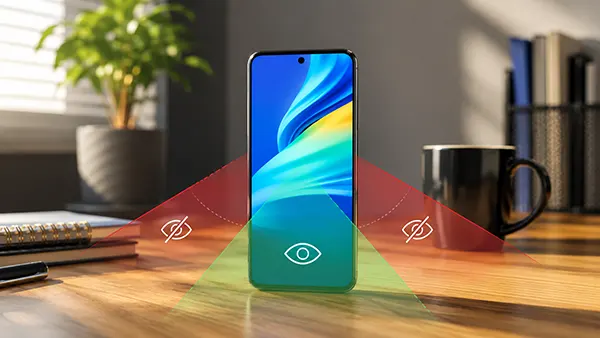
The clearest commercial example available in 2026 is the Samsung Galaxy S26 Ultra, which Samsung describes as the first mobile phone with a built-in Privacy Display. When the feature is active, the person holding the phone and looking at it from the front can still read the screen, while someone viewing from the side sees a much darker, blurred or nearly unreadable image. The effect is not produced by lowering the ordinary brightness for everyone. Instead, the display changes how light leaves the panel, reducing the useful viewing range without forcing the owner to attach an external filter.
Samsung Display identifies the underlying panel technology as Flex Magic Pixel. In simple terms, the OLED panel uses a multi-layer light-blocking structure to manage the direction in which light is emitted. A normal phone screen is designed to remain visible across wide angles, which is convenient when several people are looking at a photo but less suitable when confidential information is open. Privacy mode deliberately narrows that useful angle. The engineering is sophisticated, yet the user experience is straightforward: switch the mode on and the screen becomes much harder to read from either side.
The ability to return to a normal wide viewing angle is one of the main differences between an integrated privacy display and an adhesive privacy protector. A physical filter remains in place all day, so it can reduce brightness, colour consistency and visibility even when privacy is unnecessary. It may also affect the feel of the glass or the response of an in-screen fingerprint reader, depending on the accessory. A built-in mode can remain off during ordinary use, allowing the display to behave normally, and then be enabled for a train journey, a banking session or another situation where side visibility creates a genuine concern.
What Local or Selective Screen Protection Means
Local protection does not always mean that the whole display must become private. On the Galaxy S26 Ultra, users can apply Privacy Display to the full screen, selected apps, credential-entry fields or incoming notification pop-ups. This selective behaviour matters because a person may be comfortable showing a map or music player from a wide angle while wanting a message preview or payment app to remain concealed. In the notification setting, the protected area can be limited to the pop-up rather than changing the appearance of everything else on the screen.
The activation rules can also reduce the need to remember a manual switch. The feature can be set to engage when selected apps open, when a PIN, pattern or password is entered in supported parts of the system, or when notification pop-ups arrive. It can still be controlled from the Quick Panel when the user wants immediate full-screen protection. Samsung also provides a stronger setting called Maximum privacy protection, which narrows the viewing angle further and dims the image, although that setting can make the display look less natural to the person using it.
This form of selective privacy is based primarily on what is being displayed and the angle from which it is viewed. It should not be confused with a system that identifies every person nearby and decides who is authorised to look. In the documented Samsung implementation, the optical behaviour of the screen does most of the work. That makes the response immediate and useful in crowded spaces, but it also means the protection depends on physical positioning. A person standing close to the owner’s line of sight may still see more than someone seated clearly to the side.
When Smartphone Privacy Modes Are Most Useful
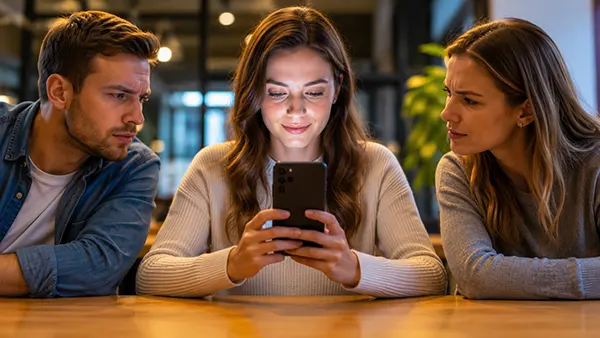
Public transport is an obvious use case because passengers often sit shoulder to shoulder while using their phones for long periods. A privacy display can reduce casual viewing of messages, bank details, email subjects and one-time passcodes without requiring the owner to lower the screen or stop using the device. The same applies in airport queues, cafés, waiting rooms and lifts. These are ordinary situations rather than advanced cyberattacks, yet a brief glance can reveal enough information to expose a private conversation, an appointment, a customer name or part of a login process.
The feature can also help in workplaces where personal and professional information appears on the same device. Someone checking a document before a meeting may have confidential figures, internal messages or contact details visible to people nearby. Selective activation for work, finance or communication apps allows the screen to remain easy to share during a presentation while adding protection during routine individual use. It is particularly useful for people who move between offices, shared desks and public areas, where the surroundings change too often for a fixed privacy accessory to feel convenient.
Privacy mode is less helpful when several people intentionally need to view the same screen. Photos, tickets, maps and collaborative documents are easier to share with a wide viewing angle, so the mode should be disabled for those moments. The owner also needs to hold the phone reasonably straight; looking from an angle can make the protected display appear darker to the intended viewer as well. A practical routine is to use automatic rules for consistently sensitive apps and keep a quick manual control available for unexpected situations.
How Software Privacy Controls Support the Screen
Most smartphones without angle-controlling hardware still include useful software privacy settings. Android allows users to hide sensitive notification content on the lock screen or prevent selected apps from showing lock-screen notifications. This protects message text, verification codes and other previews before the phone is unlocked. The exact menu names can differ between manufacturers, but the basic choice is similar: show everything, show a limited notification, or conceal the notification content until the owner has authenticated.
On an iPhone, notification previews can be set to Always, When Unlocked or Never, with controls available for individual apps. Choosing When Unlocked reduces the chance that a nearby person can read a message from the Lock Screen while the owner is away from the phone. These settings are valuable because many privacy leaks happen through notifications rather than through an app that has been deliberately opened. They also work on devices that do not contain specialist screen hardware.
Software concealment and optical privacy solve different problems. Hiding a notification removes or masks the information in a defined part of the interface, but it does not make an unlocked banking app unreadable from the side. Angle control can protect visible content across an app without changing the data shown to the owner, but it does not decide whether the notification should have appeared in the first place. Using both methods provides better everyday protection: minimise unnecessary previews, then narrow side visibility when sensitive information must remain on the screen.
Limits, Visual Trade-Offs and Security Gaps
A privacy display should be treated as a viewing-angle aid, not an invisibility shield. Samsung states that some information may remain visible depending on the observer’s angle, the surrounding brightness and other viewing conditions. Someone positioned almost directly behind the owner may have a better view than a person sitting to the side. Bright outdoor light can also make the protected screen appear darker to the owner, encouraging higher brightness or temporary deactivation. Users should therefore avoid displaying highly sensitive information when they cannot control who is standing close by.
The feature does not protect against malware, compromised accounts, remote access, unsafe links or a person recording the screen with a camera from a favourable position. It also does not automatically prevent screenshots or screen recordings, because its main purpose is to control emitted light rather than restrict access to the displayed data. Password managers, device encryption, strong authentication, current software updates and careful account security remain necessary. Optical privacy addresses shoulder surfing, which is only one route through which personal information can be exposed.
There can be visible trade-offs while stronger protection is active. Samsung notes that Maximum privacy protection may slightly blur the image or alter colours, and ordinary Privacy Display use can affect image quality outside the intended viewing range. These effects are part of the design: the screen is deliberately sending less useful light towards side viewers. The benefit is that the compromise is temporary. When the mode is switched off, the panel can return to its normal viewing behaviour rather than leaving the owner with the permanent dimming associated with many adhesive filters.
How to Configure and Use Privacy Protection Safely
Start by checking whether the phone has genuine angle-controlling display hardware or only software settings with a similar name. As of April 2026, Samsung’s support guidance states that its Privacy Display is supported only on the Galaxy S26 Ultra. Other phones may offer lock-screen concealment, private spaces or app-hiding tools without changing side-angle visibility. Product documentation should clearly state that the display controls its viewing range; vague references to privacy may describe a completely different feature.
Once the feature is available, configure it around real risks rather than leaving the strongest setting active at all times. Finance, password, health, work and private messaging apps are sensible candidates for automatic protection. Credential-entry and notification rules can cover brief moments that are easy to overlook, while a Quick Panel control is useful in crowds. After setup, test the phone from both sides at several brightness levels. This confirms how much can still be recognised and whether the screen remains comfortable from the normal holding position.
The safest approach combines screen privacy with restrained notification previews, a short automatic-lock period, biometric or PIN protection and awareness of the surrounding space. A built-in privacy display can make casual observation far more difficult without reducing screen quality throughout the day, which is a meaningful improvement over fixed filters. It cannot guarantee secrecy in every position or replace broader device security. Used with realistic expectations, however, selective viewing-angle control is a practical defence for the sensitive information people routinely handle on their phones.